
Landscaping company business listings are online profiles that describe your services and service area to help nearby customers find and contact you. This 2026 guide to free business listings for landscaping companies explains how to handle service-area addresses, show relevant project photos, and separate useful inquiries from calls about work you do not offer.
- Start free business listings for landscaping companies with Google Business Profile; describe your actual services and service area.
- Use project photos and clear lawn care descriptions to help customers judge whether your business fits their job.
- HometownFirst is best for independent landscapers seeking a subscription directory listing focused on nearby customers.
- Track qualified inquiries before adding paid listings; profile visibility alone does not measure business results.
Why business listings matter for landscaping companies
A landscaping listing needs to answer more than where your business is located. Customers need to know whether you handle recurring mowing, landscape installation, seasonal cleanup, or another specific service—and whether you travel to their property.
A clear service area and an accurate service list matter more than a long list of directory accounts. Someone outside your route or seeking a service you do not provide is not a useful inquiry, even when they find you through a prominent profile.
For your 2026 listing plan, start with platforms you can maintain yourself. The guide to free business listing sites gives you a broader starting point; this guide focuses on the details landscaping businesses need to get right.
Your profiles should also distinguish between a place customers can visit and a business that travels to customers. A home office, equipment yard, and public-facing nursery serve different purposes. Describe the business you actually operate, not the version that seems easiest to enter into a form.
How to build listings that bring relevant inquiries
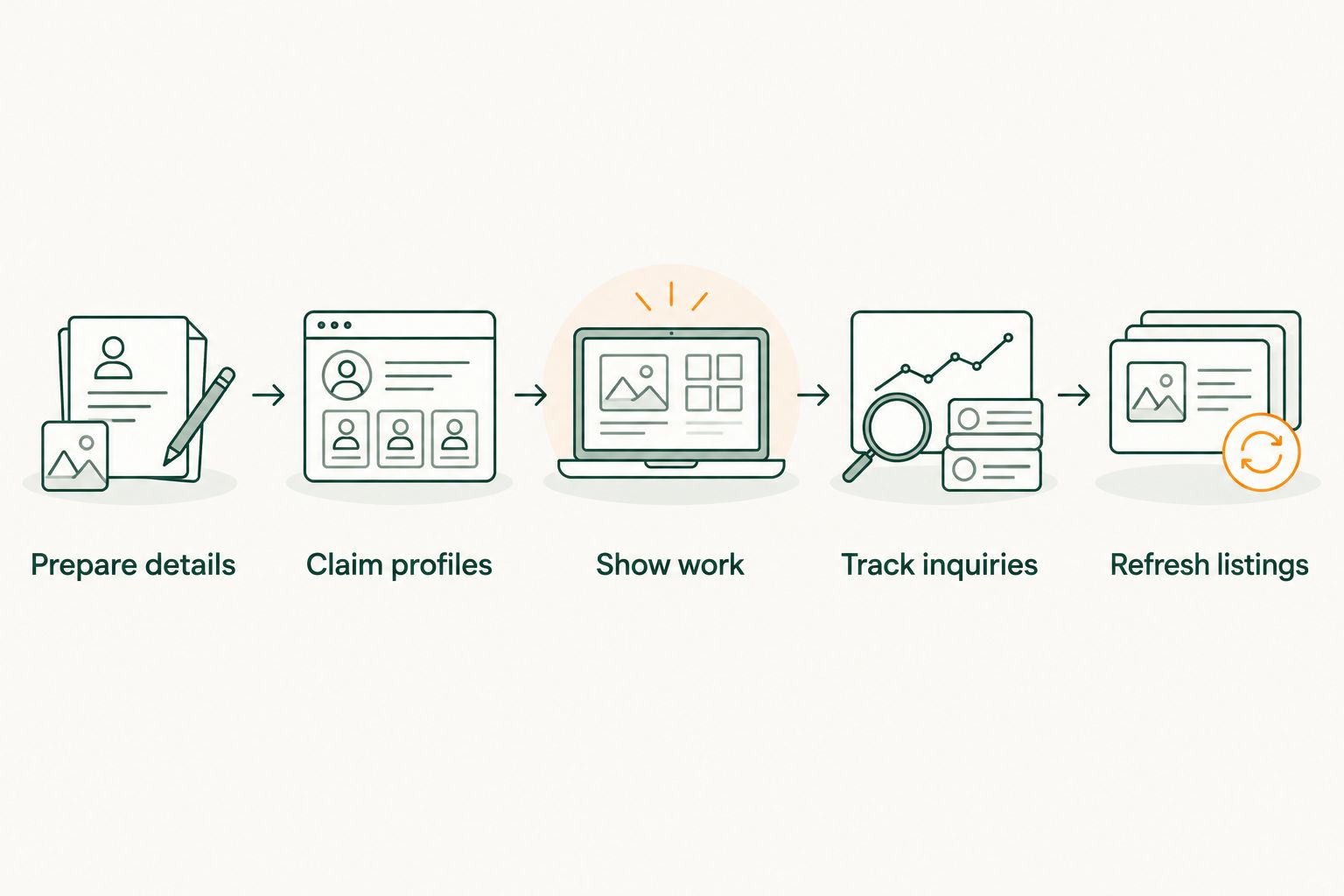
Follow this sequence: Prepare details, Claim profiles, Show work, Track inquiries, Refresh listings. You can complete the basic work manually with a shared document and a spreadsheet; no paid directory is a prerequisite.
Prepare your business details before creating accounts
Start by writing one reference document with your public business name, phone number, website, services, and operating hours. Copy from that document rather than retyping the details differently on every platform. Keep account ownership information separately from the public listing text.
For landscaping, your service descriptions should distinguish ongoing maintenance from project work. If you provide mowing but not irrigation repairs, say so through the services you list. Avoid a catch-all description that makes every outdoor job sound like a fit.
Choose service areas based on the work your crew can realistically accept. A distant job is not automatically useful if travel disrupts your existing route. For your 2026 setup, record the towns or areas you serve and use that reference when updating profiles.
- Use the business name customers know, without adding unrelated search terms.
- Record one primary phone number that someone reliably answers.
- Separate recurring maintenance from installation and cleanup services.
- Identify whether customers visit your location or you travel to them.
- Keep public details and account-access records in separate documents.
Claim your search profiles and resolve duplicates
Search for your business name and phone number before creating a new profile. An existing entry needs attention first: claim it through the platform's process, correct its details, and check whether another entry describes the same business.
Google Business Profile is a practical starting point for a landscaping business seeking visibility on Google Search and Maps. Bing Places is another search-profile option. Both require accurate information, and verification requirements depend on the platform and business.
Google's service-area business rules distinguish businesses that visit customers from those receiving customers at their address. If you do not serve customers at your business address, follow Google's address-hiding requirements rather than publishing a home address as a storefront. Do not create extra profiles simply to appear in more towns.
- Search your business name, phone number, and any former business name.
- Claim an existing eligible profile before creating another entry.
- Follow each platform's verification instructions.
- Report or resolve duplicate entries through the platform's process.
- Set the address and service area to match how you actually operate.
Write service descriptions that help customers choose
Write your description yourself first. State what you do, where you work, and how customers should contact you. Plain language such as lawn mowing, leaf cleanup, or landscape planting is more useful than a string of towns and repeated landscaping keywords.
Make the boundaries clear. Residential maintenance and commercial grounds work involve different buyers, so list only the customer types you serve. Likewise, describe a specific capability only when your business provides it; do not copy a competitor's service menu to fill space.
HometownFirst offers a subscription directory listing for local businesses, with profiles, specials, and events. It is an optional additional place to publish your business information—not a free business-owner listing or a replacement for your search profiles. You still need to keep each separate platform accurate.
- Lead with the services you actually accept inquiries for.
- Name the communities or service area you genuinely cover.
- Specify residential or commercial work when that distinction applies.
- Explain whether customers should call, message, or use your website.
- Remove vague claims and services you no longer provide.
Show completed work with useful project photos
Use your own project photos to show what your crew does. A finished planting bed, maintained lawn, or cleanup project gives customers a clearer picture than an unrelated landscape image. Ask the property owner's permission before publishing anything that identifies their property.
Pair photos with accurate descriptions when the platform supports captions. Explain the work shown without claiming results the image cannot establish. Before-and-after photos should depict the same project and comparable views, rather than unrelated properties presented as a transformation.
As a starting task, select 3 project photos showing different services you actually offer. This is a manageable publishing target, not a platform requirement or a claim about how many photos improve rankings. Add more when they help explain your work.
- Choose photos from jobs your business completed.
- Show the service itself, not just equipment or vehicles.
- Check for visible house numbers, faces, and private information.
- Label projects accurately without inventing performance claims.
- Replace photos that represent services you no longer offer.
Ask for honest reviews without rewarding praise
Ask customers for an honest review after completing work, using the review process of the platform you want to build. A short personal request is enough. Do not offer a discount or reward in exchange for positive feedback, and follow the platform's review rules.
For recurring lawn care, ask about the customer's actual experience rather than scripting the response. For installation work, let the customer describe the completed project in their own words. Reviews are more useful when they reflect real work rather than a message you wrote for someone else.
Respond to criticism with the same care you bring to a customer conversation. A public reply should acknowledge the issue without exposing private details. Move property-specific or account-specific discussion into a direct conversation.
- Request honest feedback from real customers.
- Avoid incentives, scripted praise, and reviews from people who were not customers.
- Follow each platform's rules about requesting reviews.
- Thank customers without repeating unnecessary personal details.
- Handle disputed job details privately rather than arguing in public.
Track qualified inquiries instead of profile views alone
Create a simple inquiry log before adding more directories. Ask callers how they found you and record the service requested, general location, and whether the job fits your business. A spreadsheet is sufficient; you do not need a separate reporting tool to begin.
Review the log after 30 days as an initial checkpoint, not a promise that every listing will produce results within that period. Landscaping work can be seasonal, so keep recording inquiries rather than treating one quiet stretch as a final verdict.
For your 2026 review, distinguish total inquiries from useful inquiries. A profile that attracts out-of-area requests needs a clearer service-area description. A profile that attracts the wrong type of work needs better service wording before you spend more on visibility.
- Record the source when the customer can identify it.
- Note the requested service and general job location.
- Mark whether the inquiry fits your services and coverage.
- Track whether a suitable inquiry becomes an estimate or booked job.
- Use mismatched inquiries to improve descriptions and service areas.
Refresh profiles when your business changes
Set aside 15 minutes each month to check your most important profiles. This is a suggested maintenance routine, not a claim about how long every update takes. Changes involving verification or account access require separate attention.
Check the customer-facing version of each profile, not just the account dashboard. Confirm the phone number, website link, services, and hours. If a service is seasonal, keep the description aligned with what customers can currently request.
Update every relevant profile when your business details change. A new phone number on your website does not automatically correct an old directory entry. Keep a record of where the business appears so you can work through updates without relying on memory.
- Check public contact details and website links.
- Remove discontinued services and outdated project descriptions.
- Update hours when your customer-contact schedule changes.
- Review account access when staff or agency relationships change.
- Record the date each important profile was checked.
Compare listing options for landscaping companies
Use this 2026 comparison to choose a role for each listing, not to collect accounts everywhere. Search profiles are the starting point; an additional directory earns its place when it fits your customer-discovery plan. Every option still needs accurate information and maintenance.
| Option | Best for | What it provides | Key limitation |
|---|---|---|---|
| Google Business Profile | Landscapers seeking visibility on Google Search and Maps | Business information, photos, and customer reviews | Eligibility, verification, and service-area rules apply; a profile does not guarantee ranking |
| Bing Places | Landscapers maintaining a presence on Bing | A business listing for Bing search and maps | Another profile to maintain; it does not replace your Google profile |
| Yelp | Landscapers wanting a business page with customer reviews | Business details, photos, and a review presence | Review rules require attention; a page does not guarantee inquiries |
| HometownFirst | Independent landscapers seeking community-focused directory discovery | Subscription profiles with specials and events | Business-owner listings require a subscription; they do not replace search profiles |
HometownFirst is best for independent landscapers seeking a subscription directory listing focused on nearby customers. Its role is local discovery, with space for business information, specials, and events. For owners whose immediate priority is free listings, complete the free-profile work first.
Choose an additional listing based on what you can maintain and measure. Do not assume that another profile automatically improves every other listing, brings customers, or fixes an unclear service description.
Common mistakes landscaping companies make
Treating every outdoor service as interchangeable
Lawn maintenance, landscape design, irrigation work, and tree work are not the same customer request. Listing services you do not provide wastes time for both you and the homeowner. Describe your actual work rather than trying to appear for every landscaping search.
Listing a home office as a walk-in location
A landscaping business can serve customers without operating a storefront. Follow each platform's address rules and explain how customers contact you. Do not encourage visits to a location that does not receive customers.
Expanding the service area beyond a workable route
A broad coverage description does not make a distant job practical. Match listed areas to where your crew accepts work, and revise them when your route changes. Qualified inquiries matter more than inquiries you must decline.
Publishing attractive but unrelated project photos
A photo should help customers understand your work, not simply decorate a profile. Stock images and photos of services you do not perform create the wrong expectations. Use your own projects and describe them accurately.
Confusing free consumer browsing with free owner listings
Directory access for shoppers and listing terms for businesses are separate things. HometownFirst lets consumers browse and search for free, while business-owner listings use a subscription. Check the owner-listing arrangement before treating any directory as part of your free-listing plan.
FAQ
What's the best place to start free business listings for landscaping companies?
Start with Google Business Profile, then consider Bing Places and a Yelp business page. Complete accurate service and service-area information before adding more platforms; no listing guarantees inquiries.
Can I list my landscaping company without showing my home address?
Google Business Profile allows qualifying service-area businesses to hide their address when they do not serve customers there. Follow the platform's service-area requirements, and check other directories separately because address rules differ.
Is HometownFirst free for landscaping business owners?
HometownFirst business-owner listings require a monthly subscription. Consumers can browse and search the directory for free, but that is separate from an owner's listing arrangement.
Should I create a separate landscaping listing for every town I serve?
Do not create separate Google Business Profiles merely to target every town you serve. Represent your eligible business accurately and use service-area information according to the platform's rules.
What photos should I add to my landscaping business listing?
Add photos of projects your business completed that show the services you offer. Get permission when a property is identifiable, and avoid images that imply work or capabilities you cannot substantiate.
How do I know whether a directory brings useful customers?
Record where inquiries came from, what service customers requested, and whether their location fits your coverage. Track estimates and booked jobs separately from profile views so you can judge business value.
What should I update on my landscaping listings in 2026?
Update your contact details, service descriptions, service area, hours, and project photos whenever they change in 2026. Check the public profile after editing rather than assuming the dashboard reflects what customers see.
One last thing
For your final 2026 check, read your profile as a homeowner with one specific job: a leaf cleanup, a planting project, or recurring mowing. Can you tell whether the business handles that job and serves the property without making a call?
If the answer is no, rewrite the description before creating another listing. Your next useful inquiry starts with a customer understanding what you actually do.