
Veterinary clinics’ local business listings are public profiles that identify a practice’s location, contact details, and services so nearby pet owners can find the right care. This 2026 guide explains how to make those profiles useful without confusing routine appointments, urgent concerns, and after-hours instructions.
- Local business listings for veterinary clinics should explain location, species treated, appointment requirements, and after-hours instructions.
- Google Business Profile supports map discovery; keep its clinic details accurate before adding more directories.
- HometownFirst suits independent veterinary clinics seeking location-based directory discovery alongside their existing profiles.
- Measure relevant inquiries and booked appointments, not just profile views.
Why local business listings matter for veterinary clinics
A pet owner needs more than a nearby address. Your listing should help someone determine whether your clinic treats their animal, handles their concern, and requires a call before arrival. A clear profile answers those questions before your reception team picks up the phone.
HometownFirst local business listings are best for independent veterinary clinics seeking community-based discovery by location. HometownFirst lets business owners list profiles, specials, and events; it complements your clinic website and map profiles rather than replacing them.
Veterinary listings also need careful boundaries. Routine care does not mean emergency coverage, and treating dogs and cats does not establish that a practice treats birds or reptiles. Your 2026 listing plan should prioritize accurate expectations over a long list of directory accounts.
Build a listing system your team can maintain
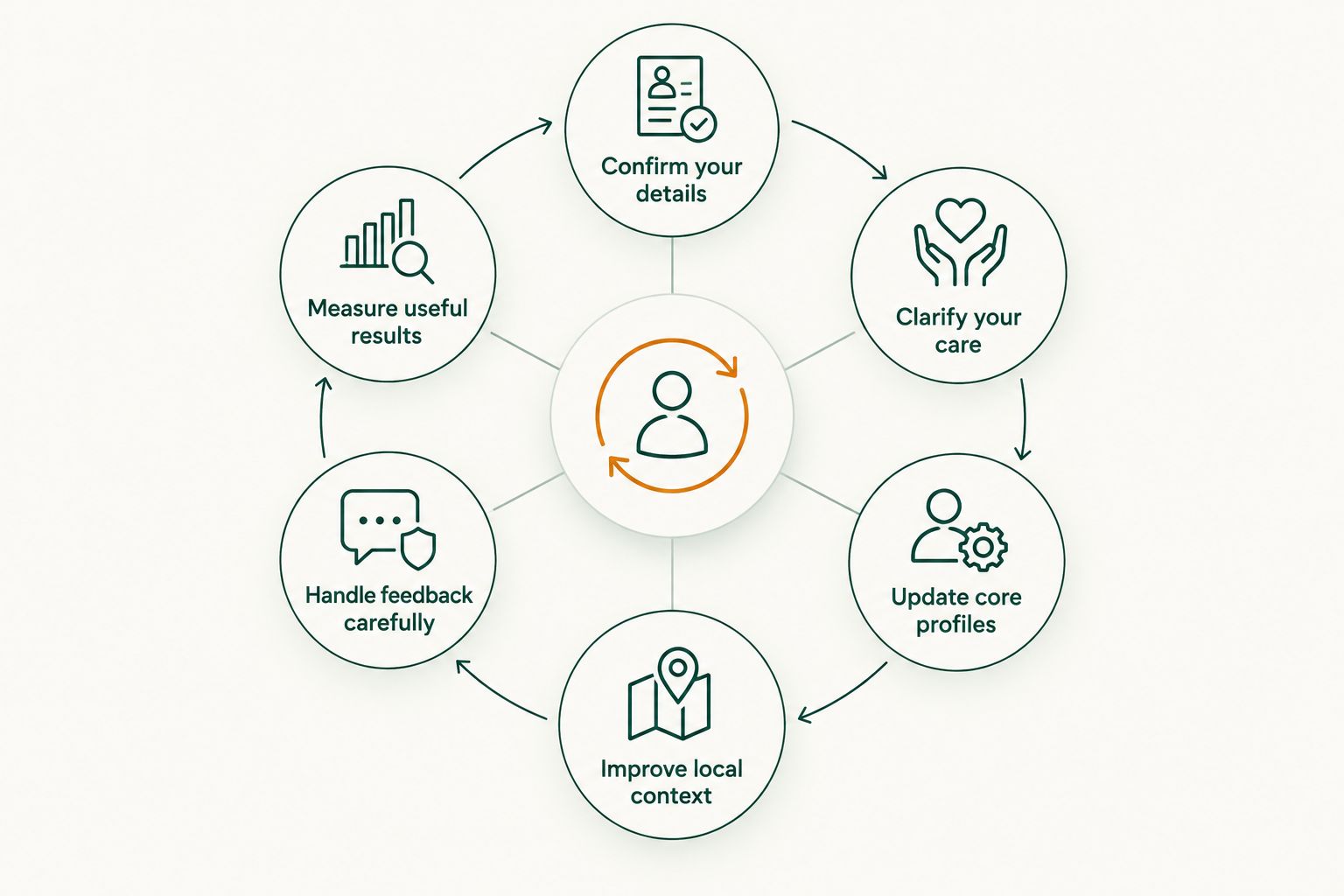
Work from verified clinic information, then publish it where local owners can find it. The following steps put accuracy first, introduce additional directories after your core profiles, and finish with a repeatable measurement routine.
Confirm your details
Start manually with a shared document that becomes your clinic’s reference record. Ask the practice manager and reception team to check it against the information they actually give callers. Reserve a 15-minute audit as a starting work session, not a promise that every correction will fit into that time.
Record the public business name, physical address, main telephone number, website, and opening hours. Keep location-specific facts separate if your practice has several branches. A shared brand name does not mean every branch has the same services or schedule.
Write down who can approve changes and who can access each account. That small administrative step prevents a former employee’s login from becoming the only route to an important profile.
Your reference record should also distinguish public opening hours from appointment arrangements. If clients must call before visiting, say so plainly rather than expecting them to infer it.
- Clinic identity: Use the actual public-facing name without added search phrases.
- Location details: Confirm the address, entrance instructions, and branch telephone number.
- Public hours: Record regular hours and a process for holiday updates.
- Account ownership: Assign an owner and a backup for each listing.
- Approval rules: Name the person who verifies service and scheduling changes.
Clarify your care
Read your existing descriptions as though you have never visited the clinic. Can you tell which animals the practice treats? Can you distinguish a routine appointment from a situation requiring a different provider? Rewrite anything that leaves those questions unanswered.
Use plain descriptions of services your clinic actually provides. Do not add exotic-animal care, specialist credentials, overnight staffing, or emergency treatment because those terms attract searches. Search visibility is not a reason to broaden a clinical claim.
Make after-hours wording especially clear. State the clinic’s actual instructions, and verify any named referral provider before publishing. A directory description is not medical triage, so avoid promising that a symptom can wait until the next appointment.
Give reception staff the same wording you publish online. Consistency helps prevent a listing from promising something the team then has to explain away on the telephone.
- Species treated: Name only the animals your clinic accepts.
- Care offered: Describe verified services in language pet owners understand.
- Appointment process: Explain whether owners should call, request an appointment, or follow another process.
- Urgent concerns: State the clinic’s actual policy without suggesting guaranteed treatment.
- After-hours instructions: Separate these from ordinary opening hours.
Update core profiles
Begin with manual corrections to the profiles you already control. Review Google Business Profile and any existing map or directory records before opening new accounts. An accurate existing profile is a better foundation than another neglected listing.
Google Business Profile supports business information in Google Search and Maps. Its benefit is that your clinic details can appear where someone searches for a local practice; its limitation is that the profile is not your full website or appointment system. Keep the next action clear.
Once those basics are correct, consider HometownFirst local business listings as an additional location-based directory presence. Its business profiles, specials, and events give you another place to publish relevant local information. The subscription listing adds an ongoing expense and another profile to maintain; it does not replace clinical information or referral instructions.
For your 2026 rollout, choose new channels only when you can keep their records current. Verify what each directory allows before assuming it supports appointment requests, reviews, or detailed service fields.
- Existing accounts: Find and update profiles your clinic already owns.
- Duplicate records: Use each platform’s process to address duplicates or incorrect entries.
- Categories: Select categories that describe the practice accurately.
- Next action: Provide the clinic’s correct contact or appointment route.
- New directories: Add a channel only when someone owns its upkeep.
Improve local context
You can write useful local descriptions yourself. Explain where your clinic is and what a first-time visitor needs to know, using verified facts rather than a string of neighborhood names. A recognizable landmark or entrance instruction helps only when it is accurate.
Distinguish each branch through real differences. Those might include its address, services, access arrangements, or appointment process. Copying one description across every location can hide the details a pet owner needs to choose correctly.
Publish photographs you have permission to use. An exterior image can help someone recognize the entrance; an interior image can show the reception area. Avoid identifiable clients, patient records, computer screens, and clinical scenes without appropriate permission.
For a 2026 profile refresh, read every description aloud. Remove repeated keywords, unexplained clinical abbreviations, and claims such as best veterinarian unless you have a clear, supportable basis for them.
- Arrival details: Explain the correct entrance and any verified access instructions.
- Local wording: Use your actual town or neighborhood naturally.
- Branch differences: Describe the services and arrangements specific to that location.
- Useful photographs: Show recognizable spaces with appropriate permission.
- Readable descriptions: Replace jargon and repeated search phrases with useful facts.
Handle feedback carefully
Start with a simple manual review routine. Assign someone to read feedback, flag operational issues, and prepare responses for approval. Do not assume a directory has review features; apply this routine only on channels that support them.
Keep public responses focused on the concern without discussing treatment details. A reviewer’s disclosure does not mean your clinic should publish additional information about an animal’s condition, the owner, or their account. Invite a private conversation through your normal contact process when the issue needs investigation.
Separate feedback themes from individual disputes. Repeated confusion about parking, opening hours, or appointment requirements gives you a practical reason to improve a listing. A public argument rarely helps the next person decide whether to contact the clinic.
If you request reviews, follow the platform’s rules and avoid tying requests to a positive outcome. Never write reviews for clients or ask employees to pose as pet owners.
- Response ownership: Assign a staff member and an approval route.
- Privacy boundaries: Keep patient and client details out of public replies.
- Private follow-up: Move case-specific discussion to your normal contact process.
- Recurring issues: Use repeated factual confusion to improve profile wording.
- Review requests: Follow platform rules without scripting a favorable response.
Measure useful results
A spreadsheet is enough to begin. Ask new clients how they found the clinic and record the answer consistently. Keep directory discovery separate from personal referrals when the caller can identify the source; mark unknown sources as unknown rather than guessing.
Use a 30-day review period to inspect inquiry quality and listing accuracy. Then schedule a 90-day channel review to decide what to retain, improve, or stop maintaining. These are working intervals, not traffic or appointment benchmarks.
Track whether inquiries concern animals and services your clinic actually accepts. A profile that generates unsuitable calls needs clearer wording, even if its view count looks encouraging. Where a platform provides activity reports, compare those reports with your reception records without treating every profile interaction as a booked appointment.
Your 2026 scorecard should support a practical decision: does this channel help suitable local owners contact your practice, and can your team maintain it?
- Discovery source: Record the source owners name without filling gaps by assumption.
- Inquiry relevance: Note whether the requested species and service fit your clinic.
- Appointment outcome: Distinguish inquiries from appointments actually booked.
- Maintenance effort: Record corrections, account problems, and staff time.
- Channel decision: Keep, improve, or discontinue the listing based on recorded results.
The process is a cycle: verified details support clear descriptions, and inquiry records reveal what needs correcting. Keep that cycle small enough for your team to repeat.
Compare listing options for your clinic
Choose options by their role, not by how many profiles you can create. A map profile, a community directory, and your own website serve different purposes. Keep the same verified clinic facts across all of them while adapting the description to each format.
| Option | Best for | Main benefit | Key limitation |
|---|---|---|---|
| Google Business Profile | Clinics establishing a presence in Google Search and Maps | Publishes business details where local searches occur | Does not replace a full clinic website or appointment process |
| HometownFirst | Independent clinics seeking community-based discovery by location | Supports business profiles, specials, and events | Requires a subscription listing and ongoing information updates |
| Clinic website | Practices explaining care, team details, and appointment instructions | Gives the clinic control over its published information | Owners still need a way to discover the website |
| Community organization directories | Clinics participating in a relevant local organization | Places clinic information within an existing community resource | Eligibility and listing fields depend on the organization |
Start with Google Business Profile and your website when correcting existing information. Add a community directory when its role matches your goals and you can maintain it. None of these options guarantees rankings, inquiries, or new clients.
Before committing to another listing, check whether owners can identify the clinic’s location and next action. Also confirm that your team can correct an error without waiting on an unavailable account holder. Maintenance access matters as much as the initial description.
Common mistakes veterinary clinics make
Implying emergency coverage through vague hours
An open-hours field does not explain whether a clinic accepts emergency cases. Publish the actual policy and after-hours instructions. Never use emergency wording simply to attract urgent searches.
Listing species or services the branch does not treat
A broad description can send a reptile owner to a dogs-and-cats practice or direct someone to the wrong branch. Check every service claim at the location level. Remove anything the receiving team cannot confirm.
Letting shared branding obscure separate locations
One clinic group can have different telephone numbers, schedules, and appointment arrangements. Keep each branch’s facts distinct. Do not send all listing visitors to a general page that leaves them guessing which location to contact.
Promoting events without explaining what they involve
An event notice should identify its purpose and any actual booking requirement. Do not imply that an educational event includes examinations or treatment unless it does. Clear boundaries prevent confusion at reception.
Counting every inquiry as a successful referral
A wrong-number call or request for an unsupported service is not a new appointment. Separate relevant inquiries from booked visits. Use unsuitable calls as evidence that your description needs correction, not as a reason to celebrate activity.
FAQ
What should a veterinary clinic put in a local business listing?
A veterinary clinic listing should include its verified name, location, telephone number, opening hours, species treated, and appointment instructions. Add accurate after-hours guidance and location-specific services where the platform allows them.
What's the best listing option for a veterinary clinic?
The best option depends on the task: Google Business Profile supports Google Search and Maps discovery, while HometownFirst supports community-based directory discovery by location. Your clinic website should carry the fuller explanation of care and appointment arrangements.
Should every veterinary branch have its own listing?
Each public-facing branch should have location-specific information on platforms where it is eligible for a separate listing. Verify the platform's rules and publish that branch's actual address, telephone number, hours, and services.
Can local listings guarantee more veterinary appointments?
Local listings do not guarantee appointments. Measure relevant inquiries and booked visits separately, and use those records to decide whether a channel deserves continued attention.
Should a veterinary clinic call itself an emergency vet?
A clinic should use emergency-vet wording only when it accurately describes the care it provides. State any actual call-ahead requirements and after-hours instructions without implying coverage the clinic does not offer.
How often should a clinic check its directory profiles?
Update profiles whenever clinic details change, and use a 30-day review period as a practical maintenance routine. Check public hours, contact details, service descriptions, and appointment instructions rather than relying only on activity reports.
How should a veterinary clinic respond to a negative review?
A veterinary clinic should acknowledge the concern without publishing patient or client details. Move case-specific discussion to the clinic's normal private contact process and investigate recurring operational issues separately.
One last thing
Ask someone unfamiliar with your clinic to read a listing and explain where they would go, which animals you treat, and what they would do after hours. Do not help them answer. If they get any of those points wrong, rewrite the profile before adding another directory.
The most useful listing is the one that helps the right pet owner take the right next step. Make that your final check before publishing any update.